Summer may be winding down, but we’ve packed it with new ReadCube features and updates we’re excited to share with you. |
Refreshed Browser Extension |
Our updated browser extension focuses on usability, visual consistency, and more flexible reference organization. Read on for more details of what to expect with the updates. |
Clearer Buttons
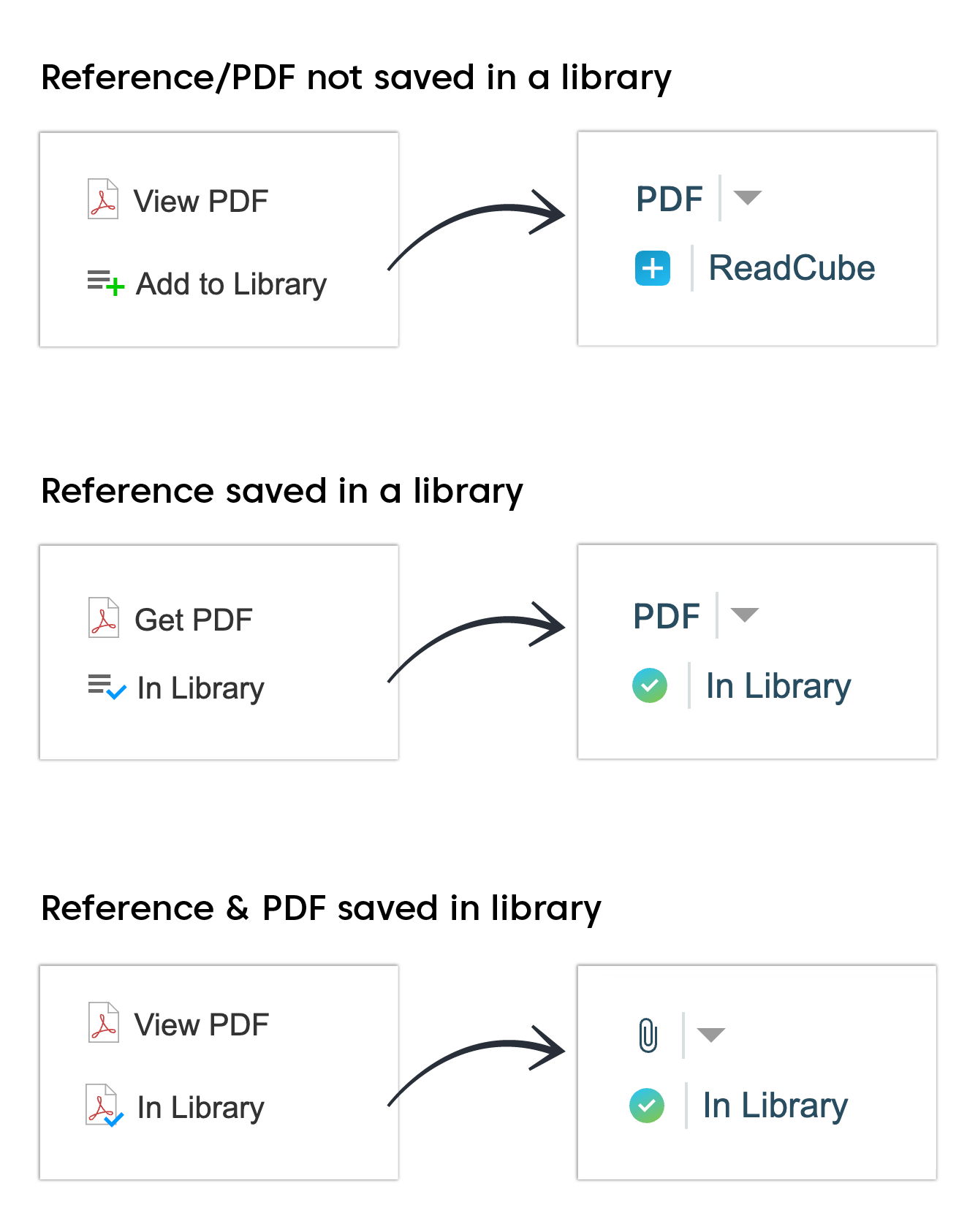
Visually redesigned buttons provide a clearer distinction between items already in your library and those ready to be added.
The ‘View’, ‘Get’, and ‘Locate’ PDF buttons have been simplified to a single ‘PDF’ label, with a paperclip icon that appears when the reference is saved in your library. This simplified design makes it easier to see if a PDF is in your library or if it needs to be downloaded. |
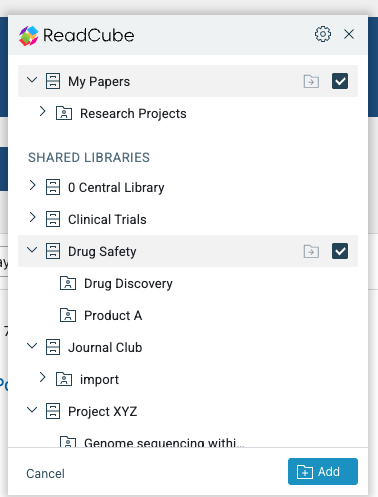
Improved Library Selection When adding new references to your library, you’ll now see a folder icon that appears when you hover over the browser extension in the navigation bar.
When you click on the folder icon, it will open a modal in the top right corner of your screen. The modal shows your ReadCube libraries in a format that is easy to scroll, includes longer, multi-level folder names, and displays more items at once—reducing the need for excessive scrolling.
Additionally, you can now specify one or more target libraries or lists when adding multiple references from search results, giving you greater flexibility and organization. |
Does my team need to do anything to access the browser extension updates?
No, the browser extension update will roll out automatically starting September 5th in Google Chrome, with Firefox, Safari, and Edge updating gradually over the following 10 days. For more details and answers to common questions, please visit the FAQ page.
Click here to see the new browser extension in action! |
New ReadCube Knowledge Base |
Explore our refreshed and expanded library of support articles to quickly find answers, discover best practices, and maximize your ReadCube experience. |
Improve Team Adoption of ReadCube |
Want to ensure your team is getting the most out of ReadCube? Enroll your organization in our Automated Feature Highlights Campaign! Available for both general ReadCube and ReadCube Pro subscriptions, this guided email series introduces your users to essential features—from discovering new content and collaborating in Shared Libraries, to simplifying citations with SmartCite—helping them unlock the full value of ReadCube. |
Connect with Us at an Upcoming Conference |
The ReadCube and Digital Science team is always eager to connect with our valued ReadCube clients. We'll be attending several upcoming conferences and would love to meet with you to discuss your ReadCube experience, share the latest updates, or simply catch up. To schedule a meeting with our team, please contact us at: g.sedita@digital-science.com.
|
Find this newsletter useful? It's only sent to ReadCube admins—so please forward it to your team to keep everyone in the loop! |
|
|
© 2025 Digital Science & Research Solutions Inc. 625 Massachusetts Ave, 2nd Floor, Cambridge, MA 02139
Unsubscribe / View in Browser |
|
|
|