We’re thrilled to announce an exciting enhancement to your ReadCube experience: a new and improved user interface, launching on December 16th!
This refreshed UI is designed with you in mind—it is modern, modular, and includes additional features to enhance your workflow. You’ll find the same great tools you know and love, with no significant changes to the functionality you rely on every day. Think of it as the best of both worlds: a familiar experience made even better. |
- Modern Design: A cleaner, more intuitive layout for easy navigation.
-
Modular Interface: Designed to fit seamlessly with your specific ReadCube solution. Explore the newest solution, ReadCube Pro, featuring powerful tools like Literature Monitoring and the AI Assistant. See them in action with this quick 5-minute video!
- Enhanced Features: Unlock new functionalities (More details below!)
|
Seamless Transition Made Easy |
Starting on the 16th, you’ll be automatically redirected to the new interface at newapp.readcube.com upon logging in. To support your organization during this transition, you’ll have the flexibility to toggle between the new interface and classic, giving you time to explore and get comfortable with the updates.
To revert to the classic version, click into setting and select ‘Revert to previous version’. |
To navigate back to the new interface, select 'Take a look' in the banner at the top of the classic interface. |
What Action Do I Need to Take? |
We’re confident you’ll love this update! If you’d like an early preview to get familiar with the new interface before the official launch on December 16th, simply contact your Client Engagement Manager. They can activate the new UI for you and other admins to explore at your convenience. |
Discover Content Across Your Organization |
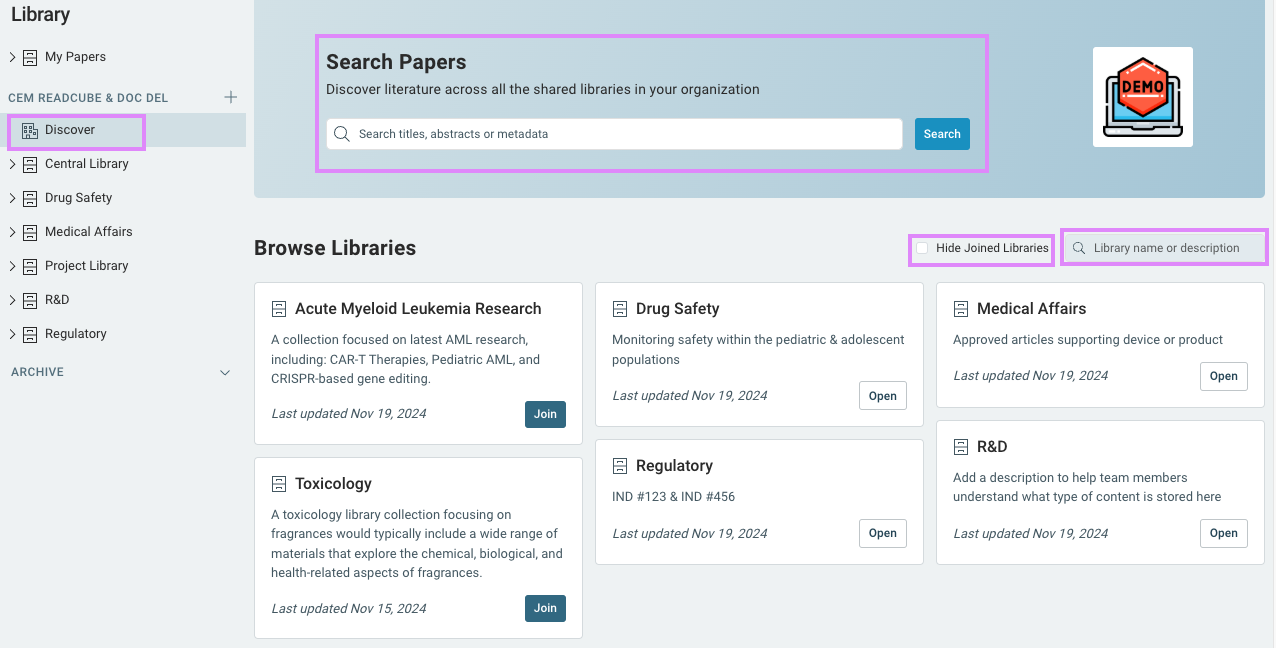
We've created a new Discover page to make it easier than ever to discover content and collaborate with your teams. In this page, there is a Search Papers section. Here, you can search for literature across all shared libraries you're a member of.
We've also introduced a Browse Libraries section to expand your discovery and make it easy to stay informed and connected with your colleagues. With this functionality, you can: |
-
Explore and Engage: Browse a list of shared libraries or use the search feature to find relevant resources by name or description.
- Enhanced Navigation: Quickly locate libraries using search, and hide those you’re already a member of for a cleaner view.
-
Preview Before Joining: Each library includes an optional description and a preview of its contents, helping you easily assess its relevance before joining.
- Flexible Discoverability: Library admins can toggle a "discoverable" setting, offering control over whether their library is visible to others based on team needs.
|
By default, all existing libraries will remain private and can be updated to discoverable in the library settings. |
New Shared Library Features |
Streamline collaboration and accessibility with these new shared library features: |
-
Smart Invites: Save time with predictive text that suggests colleagues as you type, making it quick and easy to send invitations.
- Library Descriptions: Clarify a library’s purpose and provide context on the types of papers stored with new library descriptions—making it easy for colleagues to understand its value.
-
Discoverable Settings: Empower anyone in your organization to opt in, engage, and collaborate seamlessly in discoverable libraries.
- Visibility for All: Every individual within the library can now view a list of members by selecting 'People and Groups with Access'.
-
Enhanced Admin Controls: Library administrators can now access a dedicated 'Settings' option, enabling them to add a library description, manage members, and adjust other settings for easier library management.
|
Stay Updated with Email Notifications |
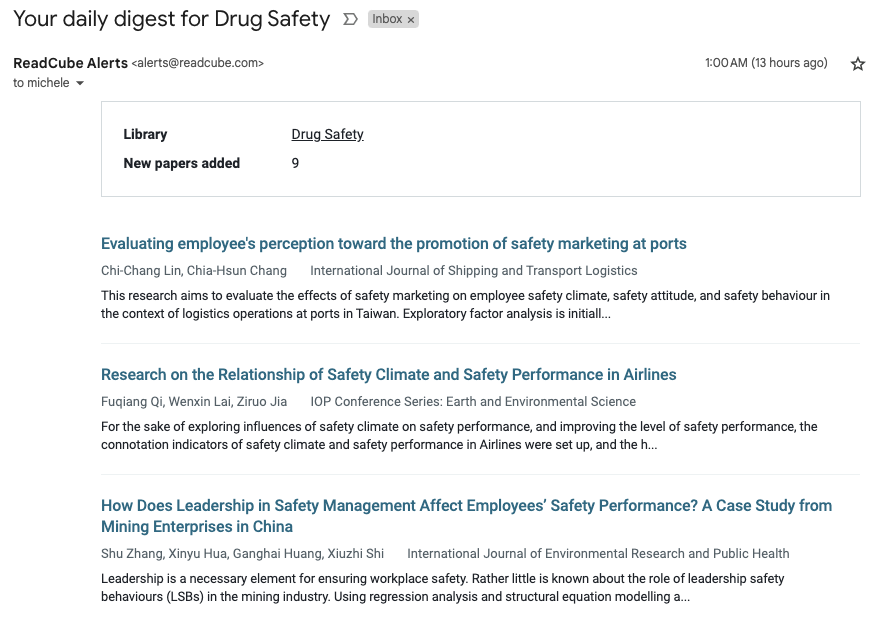
Stay informed when new content is added to your shared library with opt in email notifications. Initially launched earlier this year on a limited basis, this feature is now being released across our enterprise solution with further improvements.
Each library participant can choose their preferred notification frequency, ensuring they’re always up-to-date with the latest references added.
Each email notification provides a summary of the latest additions, including the title, author, abstract, and a direct link to the reference or entire library. |
SmartCite Now Fully Supports Microsoft Word's Track Changes |
Keep Track Changes enabled throughout your writing process—no need to disable it before updating your bibliography. Simply ensure you're working on the correct document version, and SmartCite will handle the rest!
Please note: Due to Word API limitations, the improvement requires individuals to use Word API 1.6 (or newer). If you have EndNote documents you’ll be converting to SmartCite, it requires Word API 1.4 (or newer). Please see corresponding word versions for Mac and Windows. |
|
|
© 2024 Digital Science & Research Solutions Inc. 625 Massachusetts Ave, 2nd Floor, Cambridge, MA 02139
Unsubscribe / View in Browser |
|
|
|