We're thrilled to share with you the latest and greatest enhancements to ReadCube in our Fall 2023 update. From core feature enhancements benefiting everyone to optional, specialized tools for complex workflows, there's a lot to catch up on this autumn. |
Enhanced Import/Export Capabilities |
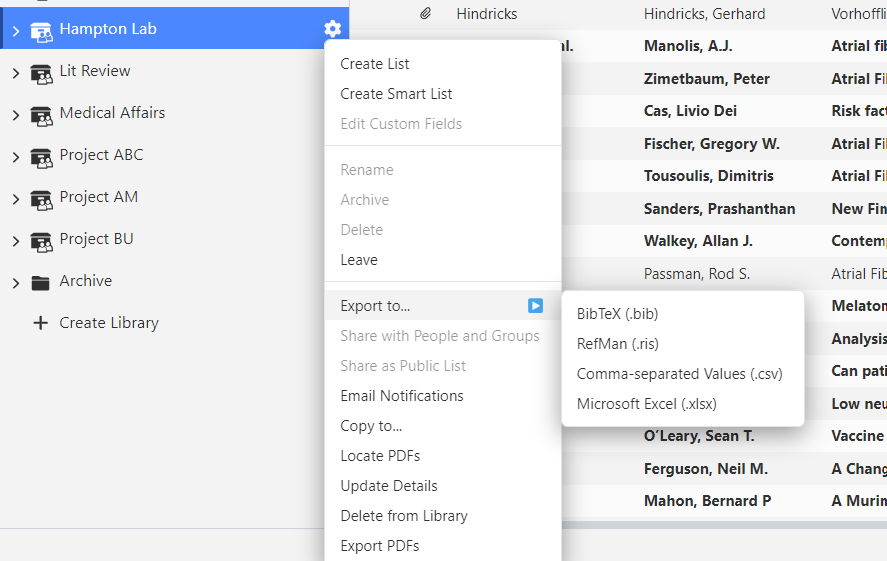
One of the essential features we added is CSV and Excel importing and exporting at the library or list level within the web app. Simply click on the COG wheel of your library or list and you will see the new export formats. |
Additional improvements to importing and exporting include: |
- CSV imports now support field mapping, making it easy to import data with non-standard formats. Templates can be saved allowing for re-use, saving you even more time.
- CSV, Excel, and RIS exports now include the URL to the article record within your ReadCube library, as well direct PDF links (when available). This empowers your colleagues with access to the library to easily navigate to the reference/article from the file.
-
Bulk exporting of PDFs is now available by clicking on the COG wheel of the library or list. Within a matter of minutes, you’ll receive an email containing a link to a zip file of PDFs.
-
Import references using a list of identifiers such as DOIs or PMIDs. Using the Add menu, you will now see an option ‘From List of Identifiers’. Select this option and enter a string of identifiers separated with a space and ReadCube will import the complete references into your library or list.
|
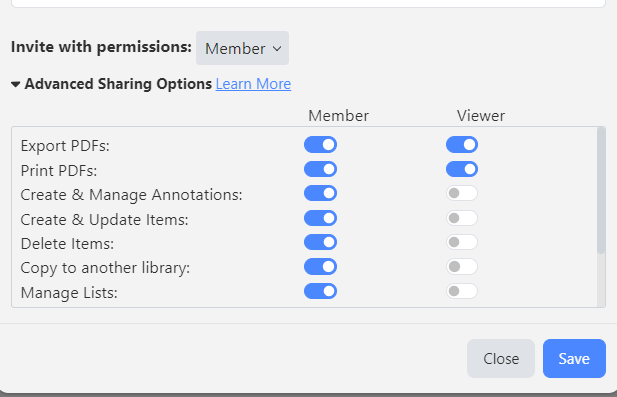
Increased Control & Flexibility | More Granular Control Over Library Permissions
We recognize shared libraries support a variety of workflows requiring unique permissions for various team members. With this understanding, we have added granular permission options so you can precisely design your library access in the way that works best for you. |
Enhanced Bulk Operations
We understand that when you are working with large sets of data, additional steps can be time consuming, so we’ve enhanced many of your favorite features to be available for bulk operations at the list or library level using the COG wheel: |
-
Update Details - Easily clean up the metadata so it aligns with the published details. Note: We do not recommend using this feature on libraries or lists containing conference abstracts/presentations.
-
Locate PDFs - When importing a list of references from a search, tracking down the PDF for every item could cost you essential time. Easily download all content available to you through your organization’s holdings with a couple of clicks!
-
Copy to a New Location - Dragging and dropping is great, but if you have hundreds of records, having to select the entire list can slow you down. Now you can easily copy the content to another location and even determine if you want to merge duplicates and annotations.
|
For more complex workflows, or where you simply need to capture additional data points outside of standard metadata, ReadCube now offers the option to add custom fields. Custom fields are easy to define and empower you to support various workflows within the platform. Check out our Custom Fields blog post to learn more about this exciting feature. If you have interest in a demo, reach out to your Client Engagement Manager or Sales Director.
|
A New Look and Refined Brand |
With all of the exciting updates to the application, it seems only fitting that we have an exciting new look to our website as well. After gathering valuable feedback from the ReadCube community we have redesigned our ReadCube brand to focus specifically on the needs of our enterprise customers. We have spun off Papers to be a standalone brand focused on individual researchers. Read more about the vision behind these changes here.
|
|
|